October 14th, 2025
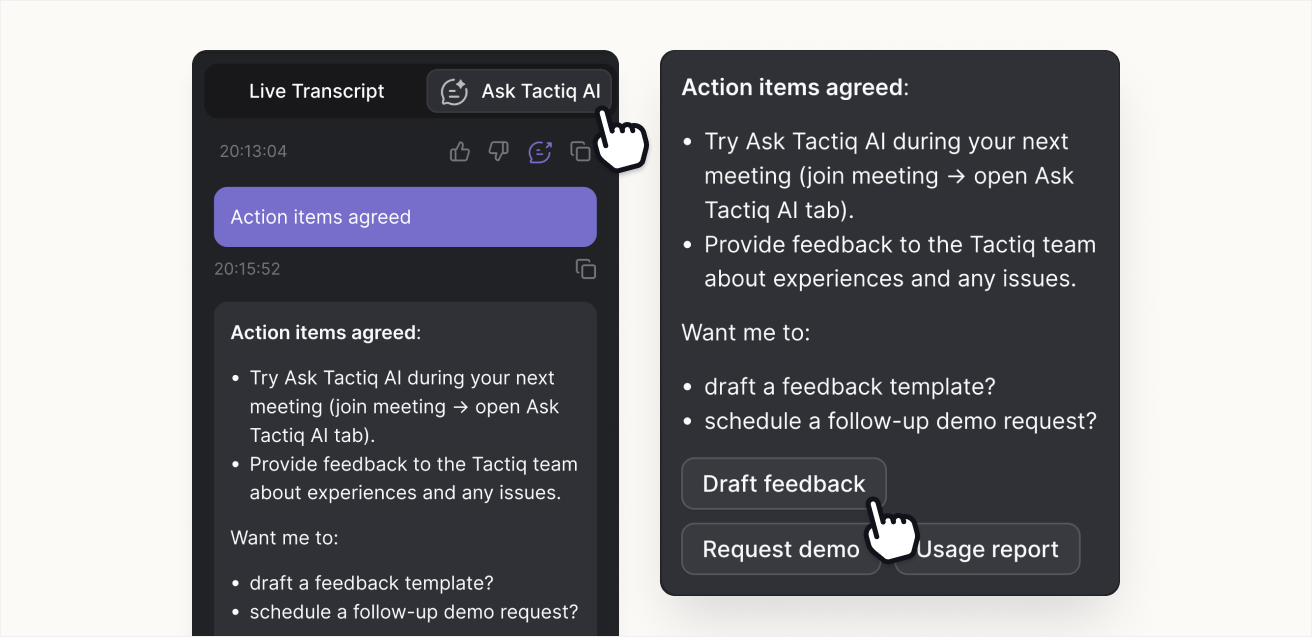
Follow-up question suggestions in Ask Tactiq AI
Ask Tactiq AI now suggests follow-up questions after every AI response, so you can stay in the flow of the conversation without needing to stop to think about what to ask next, or manually input your prompt.
By letting Ask Tactiq AI take the first pass at your follow-ups, you reduce friction and keep momentum in meetings. Quick-reply suggestions make it easier to refine summaries, clarify next steps, or extract action items — all in one click.
After each AI response in the Tactiq extension, you’ll see two or three short, clickable suggestions such as “Summarize further,” “Extract action items,” or “Give a one-liner.” Selecting one automatically fills the input and sends it as your next question, continuing the thread naturally.
How to try it
Open Ask Tactiq AI in a meeting.
Ask any question to get an AI response.
Choose one of the suggested follow-ups to continue instantly.
Follow-up suggestions are available now in the Tactiq extension.