October 14th, 2025
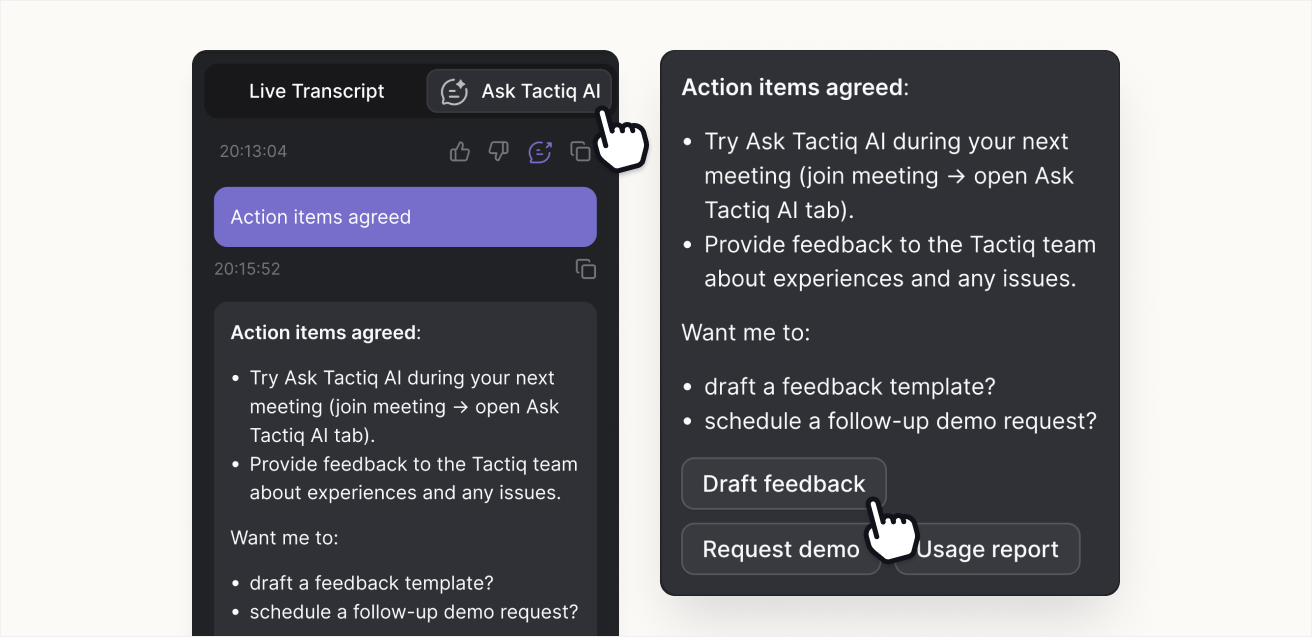
Ask Tactiq AI now suggests follow-up questions after every AI response, so you can stay in the flow of the conversation without needing to stop to think about what to ask next, or manually input your prompt.
By letting Ask Tactiq AI take the first pass at your follow-ups, you reduce friction and keep momentum in meetings. Quick-reply suggestions make it easier to refine summaries, clarify next steps, or extract action items — all in one click.
After each AI response in the Tactiq extension, you’ll see two or three short, clickable suggestions such as “Summarize further,” “Extract action items,” or “Give a one-liner.” Selecting one automatically fills the input and sends it as your next question, continuing the thread naturally.
How to try it
Open Ask Tactiq AI in a meeting.
Ask any question to get an AI response.
Choose one of the suggested follow-ups to continue instantly.
Follow-up suggestions are available now in the Tactiq extension.
October 6th, 2025
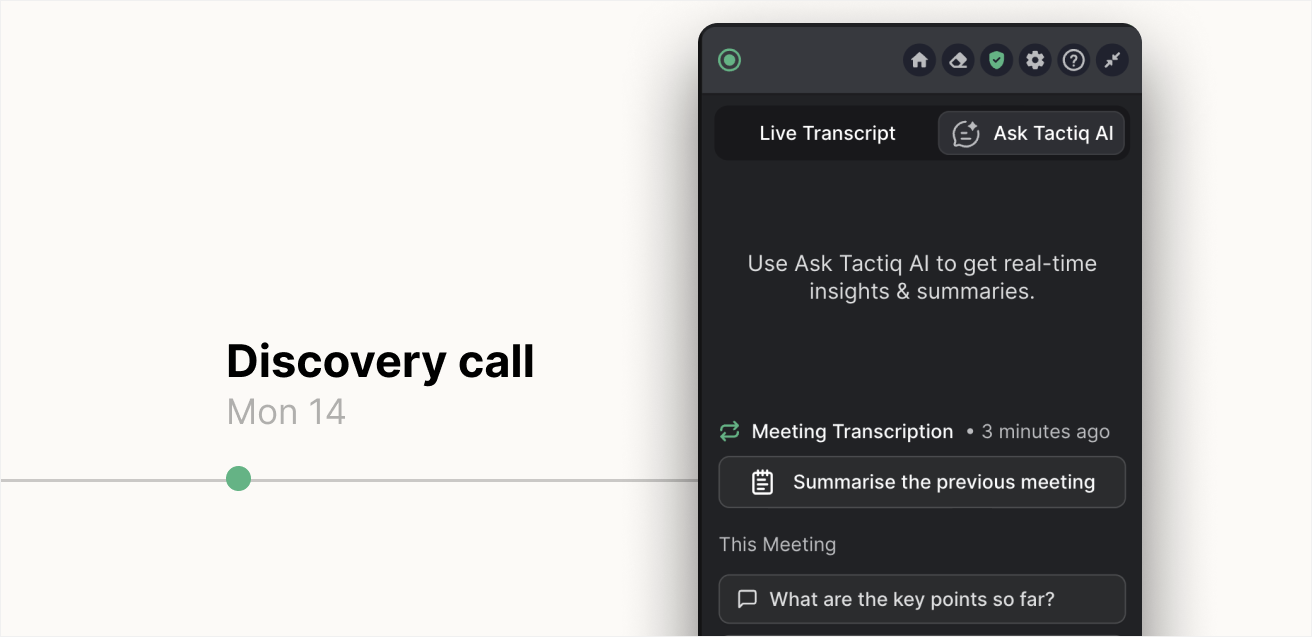
Ask Tactiq AI can now bring in context from your last related meeting, so you can instantly get caught up before the next one begins.
By letting Ask Tactiq AI take the first pass at summarizing your previous call, you can dramatically reduce the time it takes to recall discussions and decisions. Instead of searching through transcripts, you start every recurring meeting with shared context and momentum.
This update adds the previous meeting transcript directly into Ask Tactiq AI’s chat context, allowing you to generate summaries or ask follow-up questions that build on your last discussion. It’s a small layer of intelligence that changes how you show up in conversations — context preserved, flow uninterrupted.
You can access it in any recurring meeting with Tactiq:
Start your next meeting.
Open Ask Tactiq AI.
Click Summarize previous meeting to generate an instant recap.
A meeting is considered recurring if it has recurring event in your calendar.
This feature is now available for all users.
September 2nd, 2025
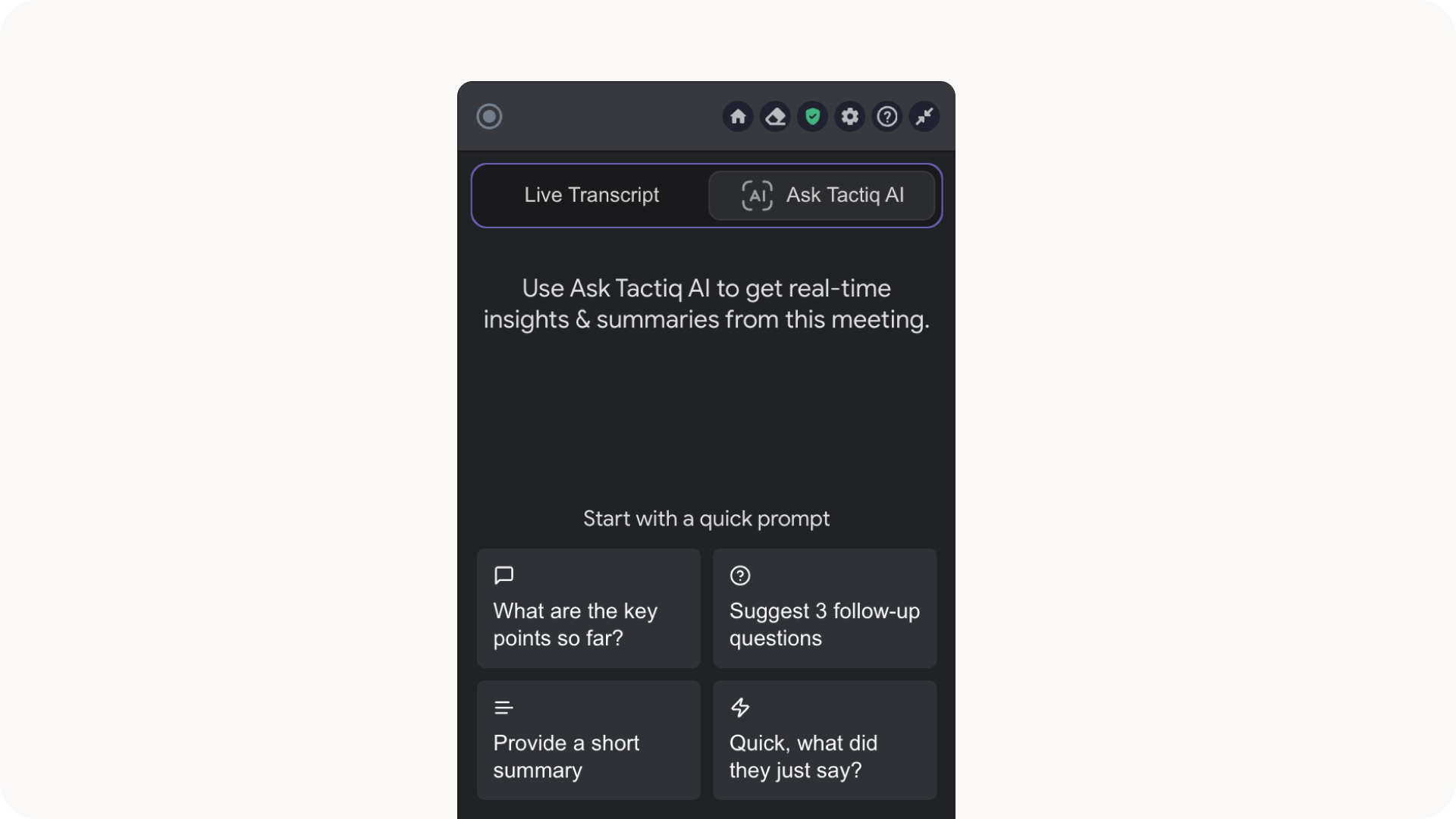
We’re thrilled to introduce Ask Tactiq AI in meetings, making Tactiq AI available for real-time use during meetings, not just after meetings end.
Live meeting AI is now available to all users on all plans! This new feature brings real-time AI insights directly into your meetings, letting you summarize conversations as they happen and get answers from Tactiq AI in real-time.
Think of Tactiq AI as your meeting thought partner: it helps you make better decisions, clarify next steps, and keep everyone aligned while the discussion is still ongoing. With Ask Tactiq AI, meetings stop being just talk — they become the place where decisions are made and actions are clear.
Ask Tactiq AI during meetings is available on all plans to all users.
What’s New
In-Meeting Summaries – Get AI-generated summaries of your meeting up to the current moment, so everyone stays on the same page.
Instant Answers – Ask specific questions about what was said in the meeting. Missed a key point? Just ask, and Tactiq AI pulls the exact context from the transcript.
AI Thought Partner – Use AI to suggest questions, provide feedback, or brainstorm solutions in real time.
Next Steps & Action Items - Use AI to generate action items during a meeting. Share outputs with meeting participants in a click.
How it works
Join your meeting (Google Meet, Zoom or MS Teams)
Open the new Ask Tactiq AI tab in the Tactiq Chrome extension
Choose from pre-made prompts or enter your own prompt
Receive instant summaries, answers, and AI suggestions — all during the meeting
Why users already love it:
Become smarter during meetings in real time, not just after
Make decisions and clarify priorities while everyone is present
Turn discussions into delivered outcomes
Start a meeting now or try it in your next meeting!
August 6th, 2025
New
Improved
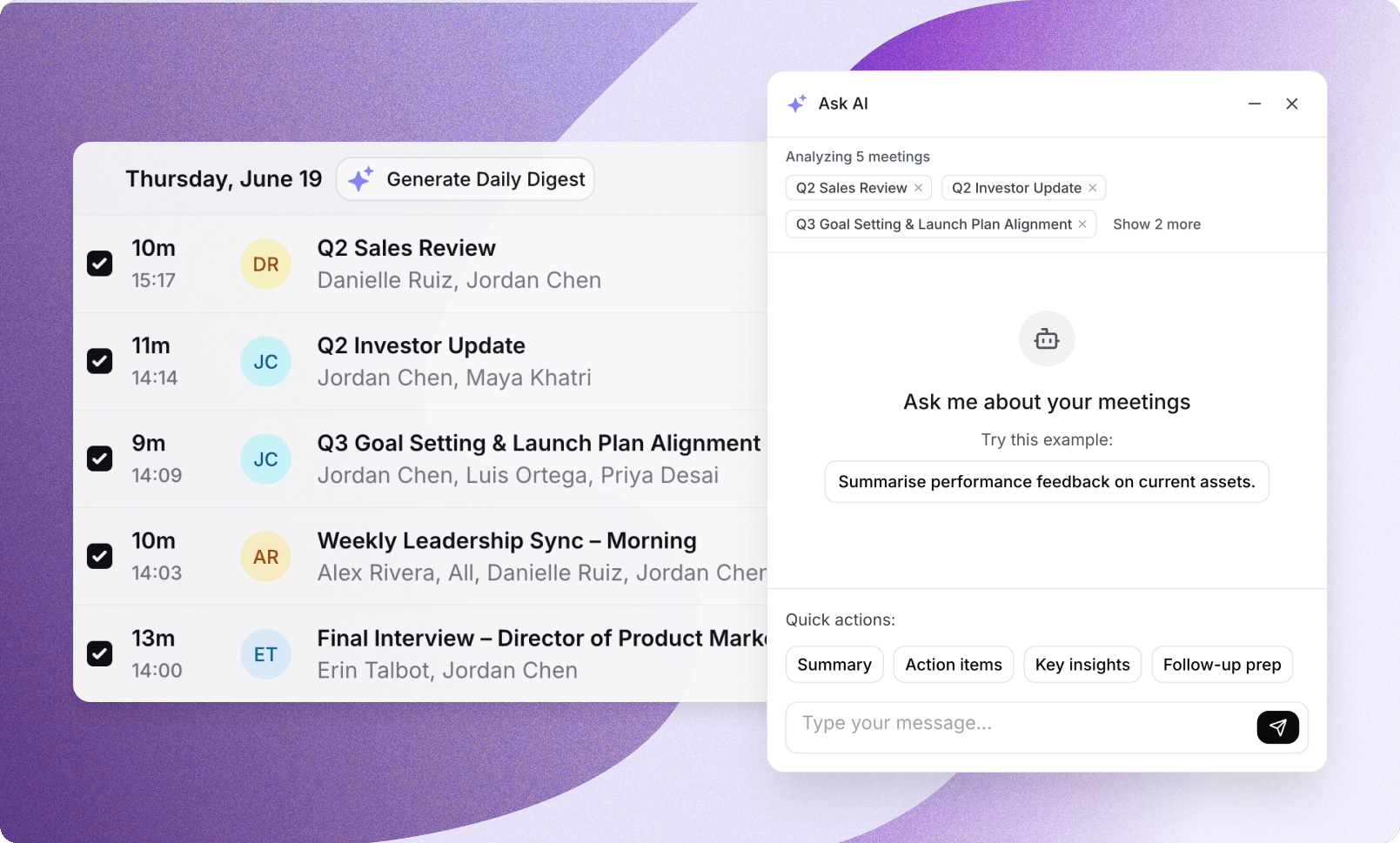
Generate AI insights across multiple transcripts, instead of having siloed insights from just one meeting.
Select up to 10 meetings from your meetings whether they’re shared or your own and use AI prompts to analyze conversations collectively. No more jumping between individual transcripts or asking teammates what’s up with “that client” or “that product launch.”
This feature is available for users on any plan.
Simply head to My Meetings in Tactiq, select up to 10 meetings and click Ask Tactiq AI to input your prompt and receive insights across multiple meetings.
Ask Tactiq AI across multiple meetings uses 1 AI Credit. Any follow up questions do not consume any further credits.
What should I use AI across multiple meetings?
Cross-Meeting Context
Instead of siloed information, Tactiq AI can now analyze multiple conversations at the same time to surface patterns, themes, and insights that were previously impossible to uncover from single meetings.
Meeting Kits integration
Run your custom saved prompts across multiple meetings for consistent analysis and scalable workflows.
Ongoing conversation threads
Build deeper analysis over time as AI remembers your previous questions and context.
Private by default
Your strategic questions always stay confidential, even when meetings are shared across your team.
How can using AI across multiple meetings help your work?
Leaders make decisions with incomplete information. Critical insights live scattered across engineering syncs, sales calls, customer meetings, and stakeholder discussions you can't always attend.
Instead of piecing together fragments or waiting for secondhand summaries, you can now ask one strategic question and get comprehensive answers with full context.
You can now ask bigger questions and get the bigger picture in seconds.
Try it out now by heading to My Meetings in Tactiq, select up to 10 meetings and click Ask Tactiq AI to input your prompt and receive insights across multiple meetings.
July 29th, 2025
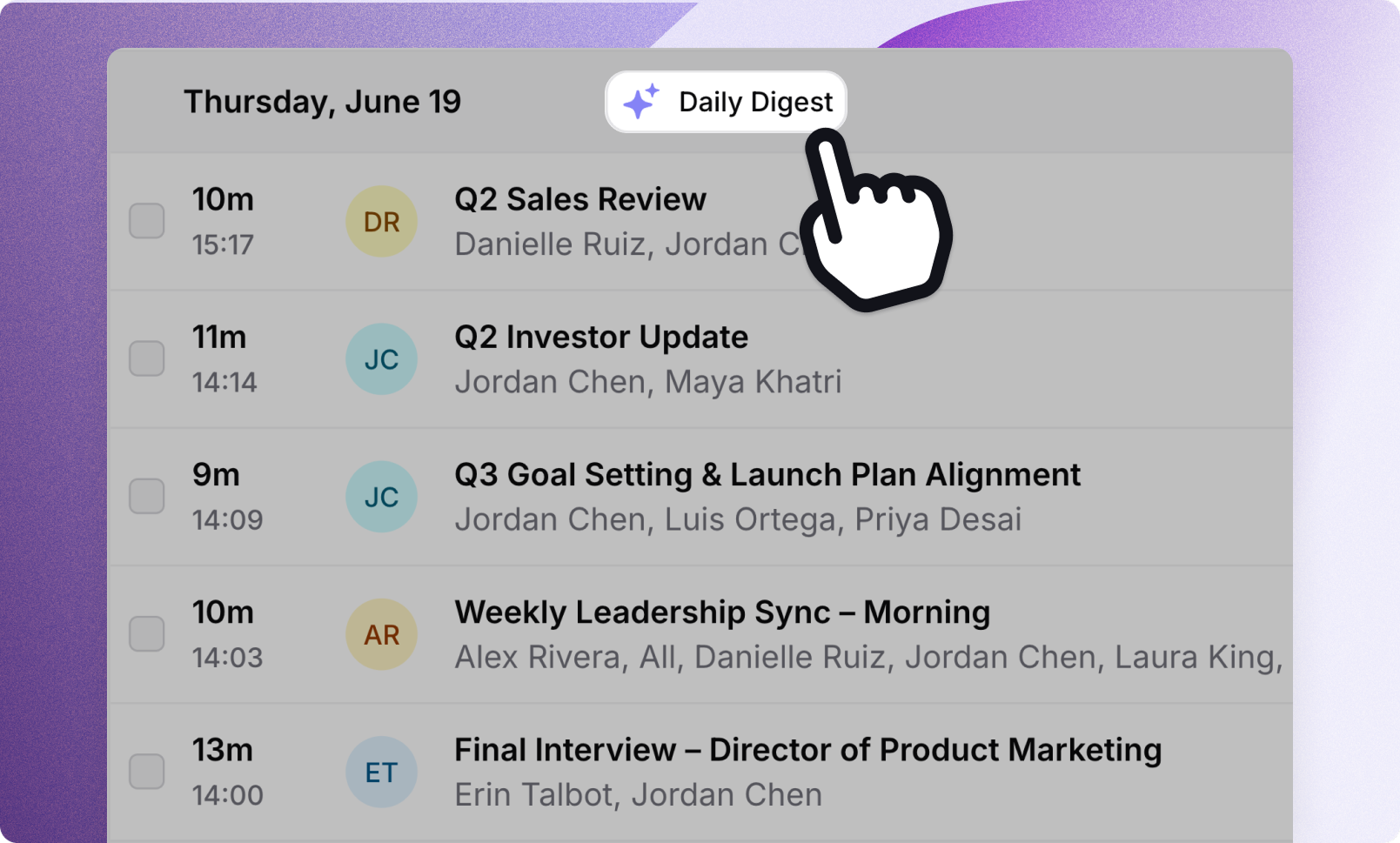
Summarize an entire day’s group of meetings in one click with the new Daily Digest feature.
Daily Digest is designed to help provide an overview of your day so you can end the day with clarity and conviction on what to tackle tomorrow. This feature is available for users on any plan.
Simply head to My Meetings in Tactiq and click Daily Digest to try the new Daily Digest feature.
Daily Digest uses 1 AI Credit. Any follow up questions ask on the Daily Digest do not consume any further credits.
What can the Daily Digest do?
Summarize your day in one click
Daily Digest summarizes and organizes the essence of all the meetings you had during the day. From decisions and blockers, to deadlines and next steps, all in a single, clear summary you can review, share, and act on.
Uncover patterns across meetings
Find common themes across your meetings from the day. The Daily Digest will surface patterns as well as draw in context from each meeting for a more comprehensive overview.
Ask follow up questions and take action
The Daily Digest allows you to ask follow up questions for additional insights from your daily digest as well as perform actions likes generating an email draft, or an action plan for the next day.
To get started simply head to the My Meetings page in Tactiq and click the Daily Digest button located at the top of each day’s transcript list.

How can Daily Digest help your work?
For Executives, Founders, and CEOs
Back-to-back investor, customer, and team meetings? End your day with a single high-level snapshot of what was said, decided, and delegated. No more digging through transcripts or missing critical moments.
For Team Leads & Managers
Daily check-ins, team standups, project syncs? Track what came up across different conversations, align tasks across teams, and catch follow-ups before they fall through the cracks.
For Product & Ops
Interviews, planning, and cross-functional alignment? See the bigger picture across multiple discussions especially useful when tracking project updates, identifying recurring themes, or surfacing cross-meeting blockers.
Why try it now?
Reflect smarter without the cognitive overload
End your day with clarity, not confusion. The Daily Digest gives you an instant summary of everything discussed so you can review decisions and next steps without rewatching or rereading anything while also enabling you to prepare faster for tomorrow.
Share one clean summary in seconds
No more writing manual updates. Share a polished daily recap with your team or leadership instantly and keep everyone aligned, without the effort.
Track daily momentum across functions
See what moved forward and what didn’t across teams, meetings, and priorities in one place. Stay on top of everything without being in every detail.
Try it out now by heading to My Meetings in Tactiq and click Daily Digest to get an instant overview of a day’s meetings.
June 23rd, 2025
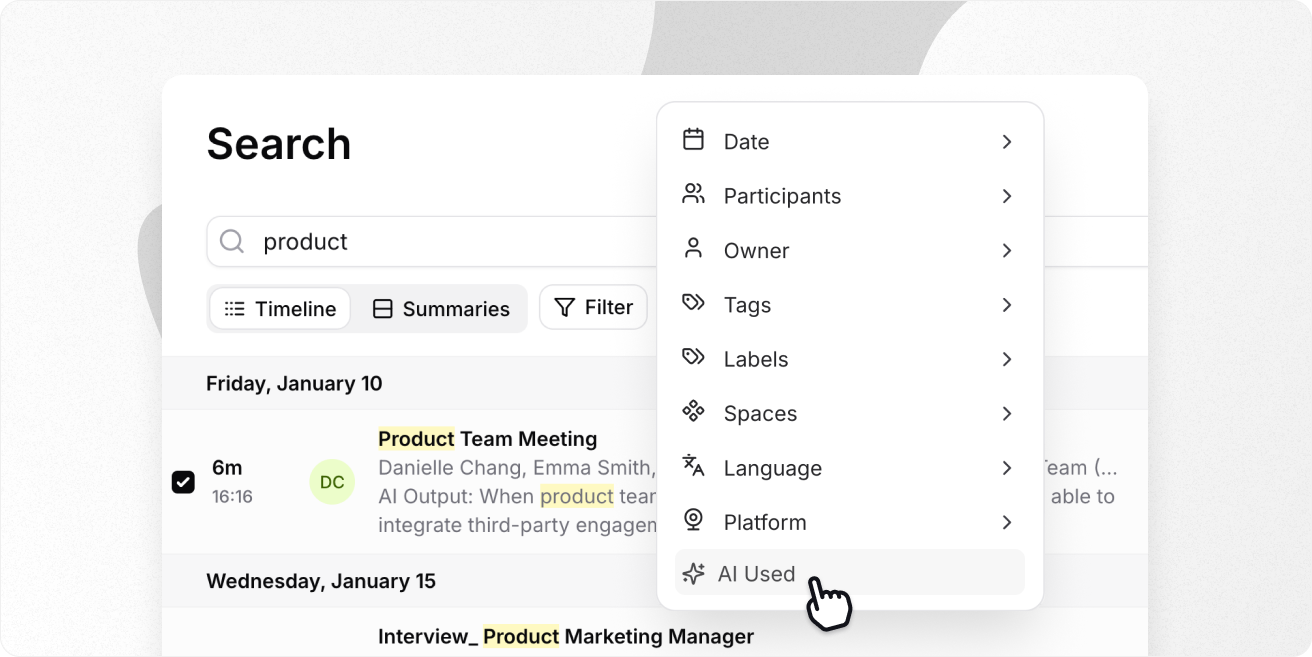
Search, find, and act - faster than ever.
Tactiq now turns all of your meetings into a searchable knowledge source.
Since day one, our mission has been to help you focus on conversations, instead of notes. Smarter decisions, instead of redundant tasks. Focused action, instead of searching for priorities.
With Tactiq, thousands of teams across product, sales, marketing, and operations have turned their conversations into follow-ups, action items, and updates — automatically.
Whether it’s finding that one customer quote, recalling a decision from Q1, or reviewing what your team agreed to last week — digging through transcripts could be better.
And now, we’re excited to launch our biggest search upgrade yet.
🔍 Meet the new Tactiq Search → Try it here
With the improved Search in Tactiq, you get a faster, more intuitive way to find the exact transcript, moment, or summary you need — even from years back.
Search across every transcript, Space, and shared meeting
No more jumping between transcripts, guessing which Space to explore, or getting empty search results. With Tactiq’s global search, you can instantly locate the transcript, decision, or summary you need — across your own meetings, team Spaces, and shared calls. Whether it happened last week or last year, it's all searchable in one unified view.
Explore summaries to find exactly what you need
Need to find a summary, follow-up, or action item — fast? Switch to Summaries so you can search directly through the insights you generated with AI, not just the raw transcript. Skip the meeting search, and go straight to the insight. Perfect for surfacing decisions, tracking progress, and following up without going through the full meeting.
Filter by participants, date range, Spaces, and AI activity
Drill into exactly the meetings you need right now by filtering your search by owners, participants, Space, time period, and even whether AI was used. Whether you're tracking everything from last quarter or zooming in on a single call, you’ll get to the right moment faster.

Search that doesn’t slow you down
Put all of your meetings to work by finding exactly what you need, previewing before you click, and never hitting a dead end again.
Lightning-fast matching: Searches across titles, participants, transcript content, and whether you used AI to generate insights
Context preview: See snippets showing exactly where your search term appears
Helpful empty state: Get helpful fallback suggestions if your first search comes up blank
Why this changes the way you use Tactiq
After a few weeks with Tactiq, you’ll have dozens of meeting transcripts. After a few months? Hundreds.
That’s not just dusty notes, it’s gold. With instant search, you can now resurface key insights from any meeting, anytime. What would’ve taken forever before takes seconds with the new search so you can revisit decisions, clarify context, and reuse what already worked.
Now, Tactiq turns meetings into a searchable, contextual knowledge source across spaces, shared meetings, and your own calls.
Recall strategic decisions, goals, and tasks in seconds
Search by meeting title, topic, or keyword. Tactiq highlights the key moments with transcript context so you can scan results and quickly find what you need, without having to open each result individually.
Avoid confusion with old decisions or chasing team members to sync again. Just search, find, and act.
Surface customer feedback instantly
Search across all sales calls or customer interviews in shared Spaces. Instantly find quotes, concerns, and patterns — with snippet previews to go deeper.
Find real voice-of-customer feedback across hundreds of meetings in seconds — fuel better roadmaps, messaging, and positioning.
Track & improve ownership without guesswork
Search your name or keywords like “next step,” “Mike will,” or “assigned to” — and filter by recent meetings.
Get clarity on what you’re responsible for (and what you’re not). Eliminate missed deadlines and expensive mistakes while also minimizing post-meeting confusion.
May 28th, 2025
New
This month, we’re unlocking a more personalized, proactive, and productive Tactiq. With new AI context settings, Space-triggered workflows, and agenda-aware summaries, your meetings can finally do more than just talk — they can deliver.
Let’s take a look at everything that’s new.
🎯 AI that understands you better
AI Context Settings
Tactiq now learns how you work — and works smarter for you.
With new AI Context Settings, you can share your goals, responsibilities, and role directly with Tactiq. That means every AI-generated insight, summary, or action item is filtered through the lens of your priorities.
So instead of one-size-fits-all responses, you get outputs that actually fit:
Product managers get highlights around user feedback and roadmap blockers
Sales leaders see objections and next steps front and center
Marketers surface messaging cues and launch deadlines
ICs stay focused on the work — not wrangling next steps
Add your context once. Tactiq takes care of the rest — in every meeting, every time.
➡️ Set it up in Settings → AI
⚙️ Space-triggered workflows
Let Tactiq take action — the moment a meeting hits your Space
Tactiq now supports Space Triggers, so the second a meeting is added to a Space like “Sales Demos” or “Campaign Planning,” your workflows fire — automatically.
Here’s how it works:
A transcript is added to the “Marketing Launches” Space
Tactiq instantly generates a custom summary
Action items are posted to Slack
Tasks are created in Notion — assigned and ready to go
🗂️ Just set a Space Name or ID in your workflow trigger. Try it out on one of your workflows here
📝 Agenda-aware summaries
Guide your AI with the structure you already planned
You already built a great meeting agenda — now your summary can follow it.
With our new Summary Based on Agenda prompt, Tactiq will use your agenda as a framework to create a more structured, focused, and meaningful summary.
That means:
Each topic broken down clearly
Key points, decisions, and actions neatly aligned
Fewer generic blurbs, more relevant clarity
Perfect for stakeholders, clients, or teammates who want a summary they can easily use.
📋 Just paste your agenda into the prompt after your meeting.
Try it out here by accessing the prompt in the quick prompts menu of any transcript
May 16th, 2025
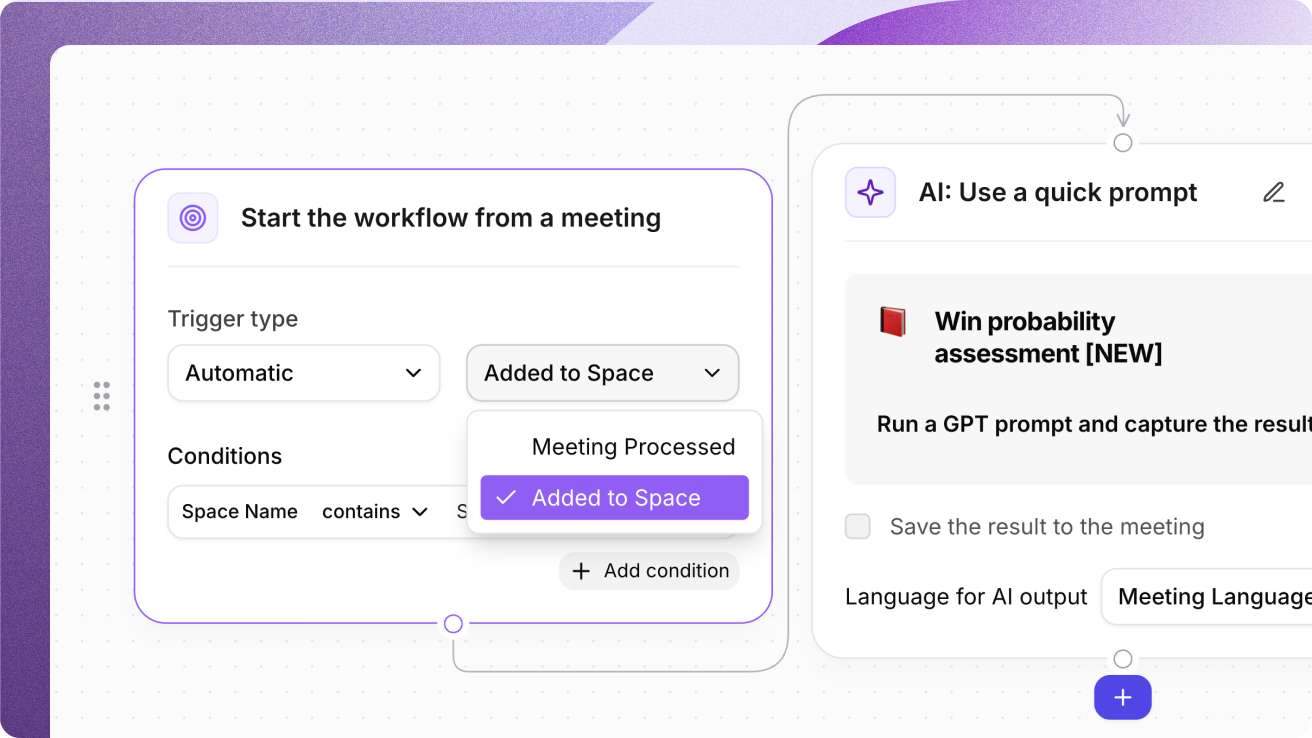
Adding transcripts to Spaces can now automatically generate & share follow-ups, summaries, and project updates from meetings with the new AI Workflow trigger type - Space name or ID. Set your trigger type to automatic and select Added to Space as the trigger.
Setup the meeting insights you want to generate from transcripts in specific Spaces so you can automatically have the updates you need, across the right apps at your fingertips.
Stack conditions for relevant automation

Add a condition for Space Name or Space ID in the Trigger type of the starting node to target updates to the right projects, teams, or clients without lifting a finger.
Build logic like:Meeting Title includes "Demo" AND Space Name includes "Customer Success"
Participant Names include "David" AND Space ID is "abcd1234"
Why are Space triggers useful?
Team members can now get instantly aligned by having a summary automatically generated and/or the insights shared to your tools like Slack as soon as the meeting is added to a space.
Are you in Sales? Set up a Win Probability prompt to trigger when a meeting is added to your Sales space and see the win probability assessment and main customer pain points.
Are you in Engineering? Quickly get aligned on roadmap updates, retrospectives, or new JTBD statements your team is working on.
Are you in Marketing? See key launch timelines, team responsibilities, and requirements on marketing materials you need to create.
Build relevant automations with Space-based triggers
Your workflows are only as effective as the context they’re built on. With Space Name or Space ID as a trigger, Tactiq now lets you generate insights the moment a transcript lands in the right Space.
May 14th, 2025
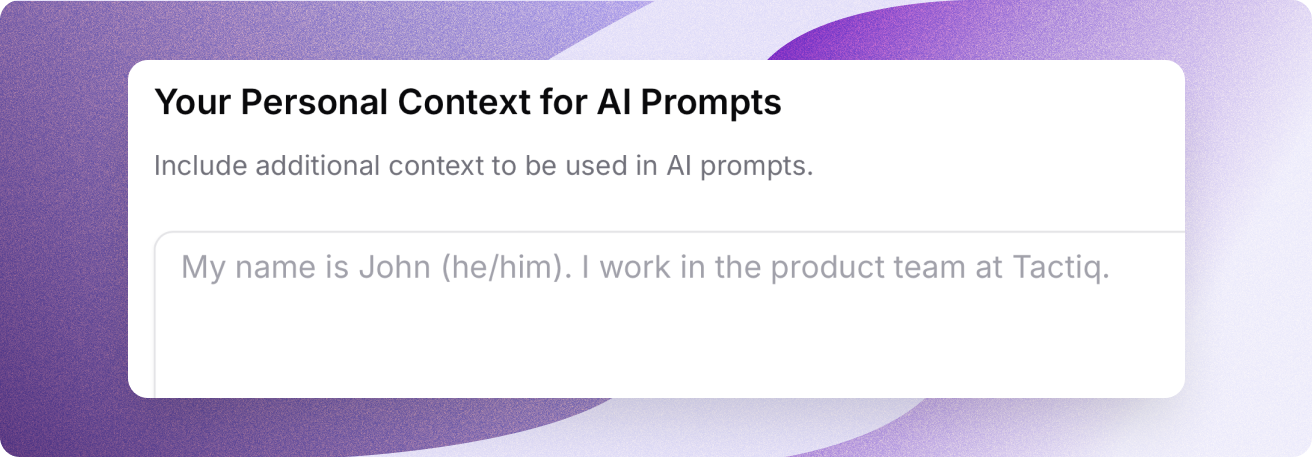
Tactiq now has a new AI tab in settings that gives you the ability to enrich AI insights for every meeting with your own personal and structured context.
Whether you're in Engineering, Sales, or Marketing, Tactiq AI can now understand your domain, priorities, and responsibilities so you can spend less time tweaking AI outputs and more time on real work.
Enrich meeting insights based on your role
Define your work — role, function, and goals so you can adapt the AI-generated meeting insights to help your personal workflow and specific objectives.

Personalize AI-generated updates to your exact needs
Share your tone and style with Tactiq so our AI can produce personalised AI insights in your style and in the way that reflect you best.
Drive smarter decisions, precise execution, and better team alignment with personal context for Tactiq AI.
April 30th, 2025
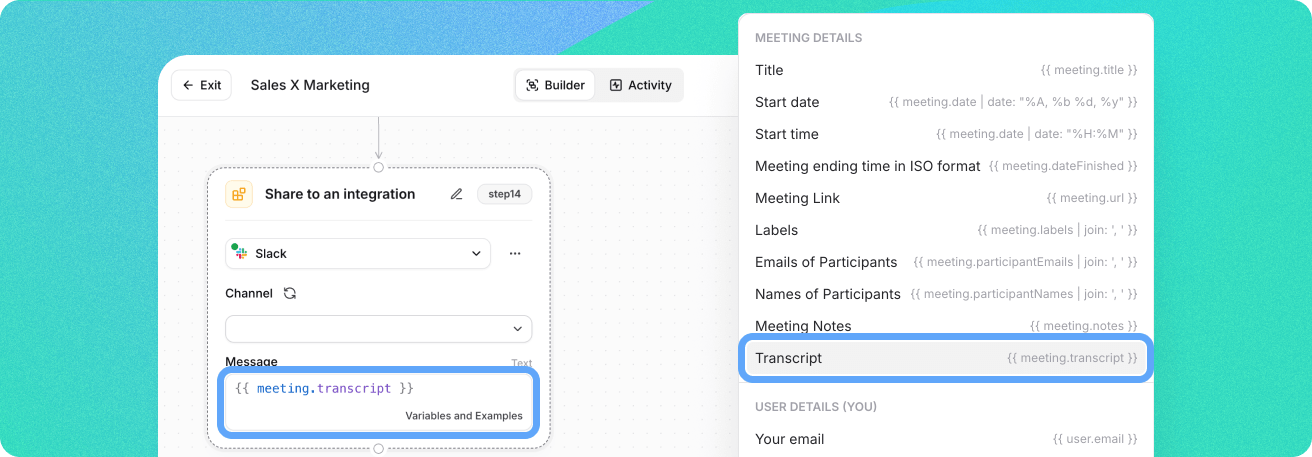
Share entire transcripts instantly after calls with meeting participants, customers, or other team members who need to stay in the loop. Now you can add the transcript to your AI Workflows when sending insights to an integration.
No more manual sharing transcripts after meetings via individual email addresses or shareable links that require manual actions and clicks.
Now you can automate those steps with AI Workflows so you can keep people in the loop while you jump straight to work, without delays and distractions.